LinkedIn is simple enough to use, but it is such a powerful and thorough tool that there are many points which can be easily overlooked. These incredibly useful tips are not only going to make your LinkedIn profile the strongest it can possibly be, they are also going to change the way you use your LinkedIn for business.
1) Customize Your Public Profile URL 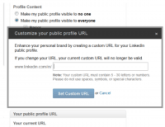
2) Use Buttons Everywhere
3) Show Your Work
4) Customize Entire Sections
5) Let Yourself Be Seen
6) Check Out Who’s Checking You Out
7) Work In Groups
8) Advanced Search
9) Contact Information is Key
10) Attract Recommendations and Endorsements
Chosen excerpts by Job Market Monitor. Read the whole story at Top 10 Most Overlooked LinkedIn Profile Tips | JobMob.
Related Posts
LinkedIn – A free beginner’s guide (Slideshare)
When people talk about social media, they usually mention Facebook and Twitter. But for professionals who are serious about using social media to advance their careers, there’s no better network than LinkedIn. In this presentation, The author provides some stats on why you shouldn’t ignore LinkedIn. The presentation also provides some important details when filling … Continue reading
Job Search with LinkedIn – Getting recommendations
The best way to obtain high quality LinkedIn recommendations is to treat them similarly to obtaining formal recommendation letters: Contact only those people who know you well and can provide specific examples of your strengths and differentiators. For each person you ask to write a LinkedIn recommendation, provide them with three skills that you’d like … Continue reading
LinkedIn – Your current position when you’re unemployed: “open to opportunities”
Krista Canfield, PR Manager at LinkedIn has suggestions: “If you’re currently unemployed list your current position as “open to opportunities.” If you just recently lost your job, make sure you update your status field in your profile so your network knows that you’re looking for a job. You can update it with, “John is currently … Continue reading
Job Search with LinkedIn / How to use it
The first, and most important thing to do is to make sure that your profile is up to date and as informative as possible – LinkedIn can only suggest jobs for you if it has a good idea of what you’ve done already. Equally, you want potential employers that look you up to see a … Continue reading
Job Search and LinkedIn Profile / Please Polish it
“If a candidate doesn’t complete their profile with their relevant experience, it makes it hard to determine their qualifications when recruiting,” says Jason Woolwine, senior recruiter at Apptio, Inc.Continue reading
Job Search with LinkedIn / Close to 100% of job seekers use it as their number one social media
According to a new survey of job seekers, hiring managers, recruiters and HR executives, close to 100% of job seekers use LinkedIn as their number one social media site for job hunting Continue reading


 Job Market Monitor
Discussion
Trackbacks/Pingbacks
Pingback: Job Search – The words which will lead the right recruitment agents and employers (video) | Job Market Monitor - August 1, 2014
Pingback: Job Search – Using apps designed for job seekers | Job Market Monitor - August 14, 2014
Pingback: LinkedIn – The New Recruiting Firm’s Field Guide | Job Market Monitor - September 16, 2014